FEATURE FLAGS FOR PRODUCT + ENGINEERING
Choose who gets it.
See who uses it.
Developers prepare the flag. Product and engineering shape the audience and rollout together, then review adoption.
 vlag.
Discuss a rollout
vlag.
Discuss a rollout
FEATURE FLAGS FOR PRODUCT + ENGINEERING
Developers prepare the flag. Product and engineering shape the audience and rollout together, then review adoption.
THE RELEASE, IN ONE VIEW
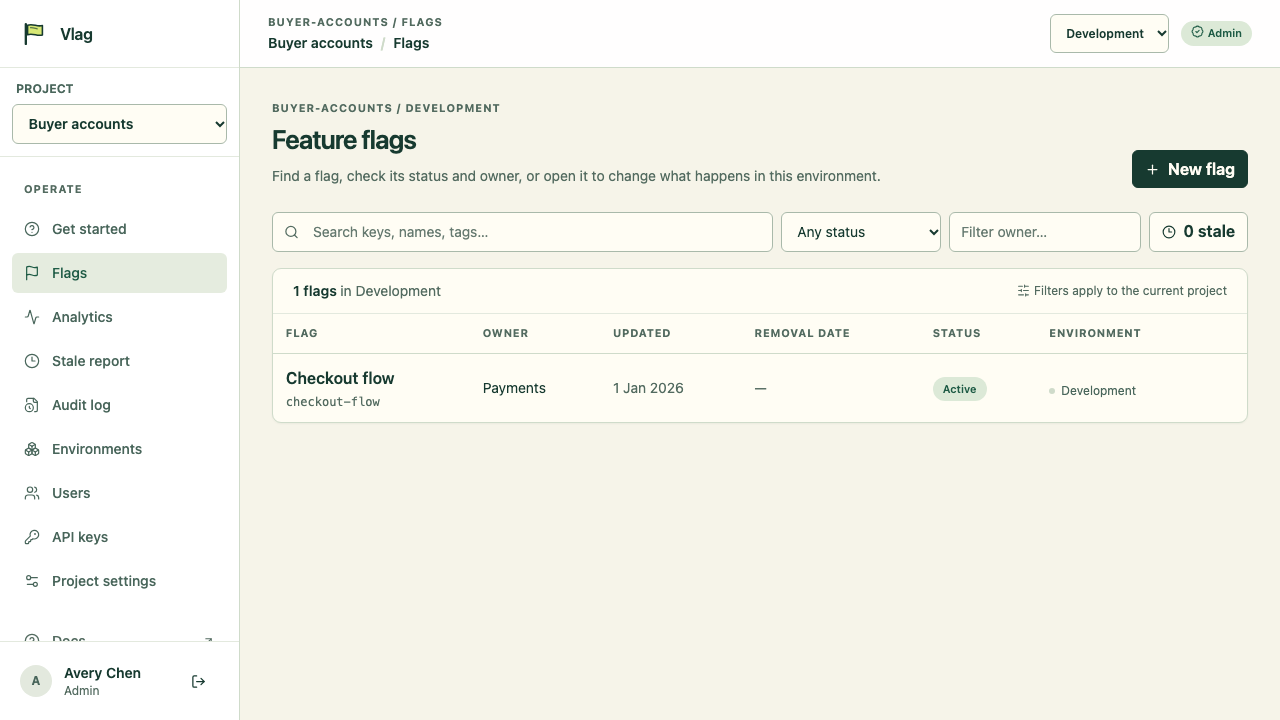
Check each flag’s owner, last update, removal date, status and environment from the project list.
FOR ENGINEERS + PRODUCT
Use environments, audience rules and gradual rollout together. Start with the group you mean to reach, then widen the release when the team is ready.
See how the app checks a flagExample counts only · actual results depend on SDK events and selected range.
SEE WHAT HAPPENED
See evaluations, exposures and uses alongside adoption and return measures. Use the evidence to guide a team conversation; comparisons describe what happened and do not prove the change caused it.
How to read flag analyticsKEEP RELEASES OWNED
Give each flag an owner and expected removal date. Review its change history, then archive it when the temporary switch has done its job.
A flag is a useful release tool when it has someone to look after it and a clear end.
FOR DEVELOPERS
The TypeScript SDK and REST endpoint evaluate flags for your application. Keep environment keys in a server or Worker secret, and use your own backend when browser code needs a flag.
The TypeScript package is currently private to the Vlag workspace; it is not published on npm.
The rule shown is an example: map your app’s account plan to this attribute. The sample user has the Plus plan.
Read the SDK guideimport { createFlagClient } from "@vlag/sdk";
const flags = createFlagClient({
apiUrl: process.env.VLAG_API_URL!,
apiKey: process.env.VLAG_API_KEY!,
environment: "production",
defaults: { "new-checkout": false },
});
const context = { userId: currentUser.id, attributes: { plan: currentUser.plan } };
const result = await flags.getBoolean(
"new-checkout",
context,
false,
);
if (result.value) {
showNewCheckout();
flags.trackExposure("new-checkout", context, result); // when the feature is shown
}
// Wire into the app's successful-checkout callback:
const recordCheckoutUse = () =>
flags.trackUsage("new-checkout", context, result);
// After tracking in a Worker request: ctx.waitUntil(flags.flush())# Replace both placeholders with this user's stable ID and actual account plan.
# In Bash, pipefail keeps a failed curl request from appearing successful through jq.
# To measure exposure/use, also POST feature_exposed/feature_used events to /v1/events.
set -o pipefail
curl --fail-with-body --silent --show-error \
"$VLAG_API_URL/v1/evaluate" \
-H "Authorization: Bearer $VLAG_API_KEY" \
-H "Content-Type: application/json" \
-d '{"flags":[{"key":"new-checkout","fallback":false}],"environment":"production","context":{"userId":"REPLACE_WITH_STABLE_USER_ID","attributes":{"plan":"REPLACE_WITH_USER_PLAN"}}}' \
| jq '.data.results[0].value'SDK evaluations and exposure/use calls queue events in memory. Flush before a short-lived request ends (ctx.waitUntil(flags.flush()) in Workers); long-running apps can flush periodically. REST callers send separate feature_exposed and feature_used events to /v1/events.
Implement this Vlag flag evaluation in the trusted server-side application. Use the selected environment and a stable per-user ID from the application. Map the plan attribute to the application’s actual account plan; Plus is only the sample. Keep the environment key in a server or Worker secret; never put it in browser code or logs. Use the application’s safe fallback when evaluation fails. Confirm the configured flag returns the expected value before relying on it. SDK exposure/use events queue in memory, so flush them before a short-lived request ends (for example, ctx.waitUntil(flags.flush()) in a Worker); REST callers post exposure/use events separately to /v1/events. The TypeScript package is private to the Vlag workspace, so do not assume it is available from npm.
Use a stable application user ID for targeting. Choose a safe fallback for failures.
PLANNED
We are exploring a small-team inbox for release clues that may need a closer look.
New checkout · Production
CLEAR ANSWERS
Vlag is being built in the open. Here is what the product can and cannot do today.
Not yet. Vlag is under active development and is not currently offered as a public hosted service. Email us if you would like to follow its progress.
The TypeScript SDK uses a safe fallback value when evaluation fails or times out. Choose a fallback that keeps your application behavior safe. The SDK timeout defaults to 500 milliseconds and can be configured.
No. SDK keys allow evaluation and analytics ingestion for one environment. Store them in a trusted server or Worker. Browser code should ask your application's backend for the result.
No. Vlag reports evaluations, exposures, uses and descriptive comparisons. A measured difference can help a team decide what to investigate, but it is not proof of causation.
The repository includes deployment configuration for operating the API, dashboard and PostgreSQL database yourself. That means setting up and maintaining the services; Vlag does not provide a hosted service today. Contact us about the current setup.
Vlag · IN DEVELOPMENT
Vlag is an independent software project. Its dashboard, API and TypeScript SDK are in development; public hosted access is not available yet.
Talk with us